To ensure accurate record-keeping and make it easy to track sessions, please include the EMIS Number for each session in your transcripts. Here’s a simple guide:
Locate the EMIS Number:
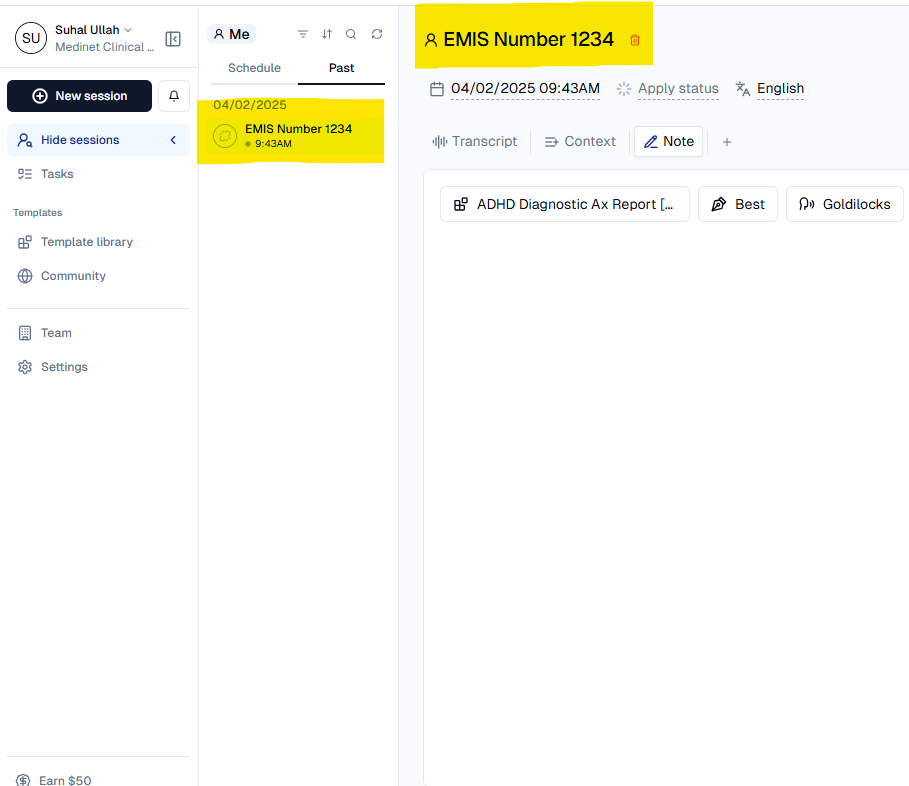
- On the session page, you will see the EMIS Number displayed at the top of the session (highlighted in yellow in the example).
Add to Transcript Notes:
- Click the Note tab within the session.
- Include the EMIS Number at the start of your note or transcript entry (e.g., “EMIS Number 1234”).
Consistency Matters:
- Always document the EMIS Number for every session. This helps the team track reports accurately and ensures smooth communication across services.
Was this article helpful?
That’s Great!
Thank you for your feedback
Sorry! We couldn't be helpful
Thank you for your feedback
Feedback sent
We appreciate your effort and will try to fix the article