EMIS have chosen to ensure EMIS Web is compatible with LibreOffice, which is a free open-source desktop solution, as it offers similar functionality to what you have previously used (MS Word).
If you do not have Microsoft Word installed on your device you can install LibreOffice (v 6.4.6.2 - 32 bit), which allows you to continue using the full functionality in EMIS Web and is free of charge.
Note: The 32 bit Libre Office application is not compatible with EMIS Web 64 bit. Therefore when upgrading to EMIS Web 64 bit Libre office must be updated at the same time.
64 bit download - Index of /libreoffice/old/6.4.6.2
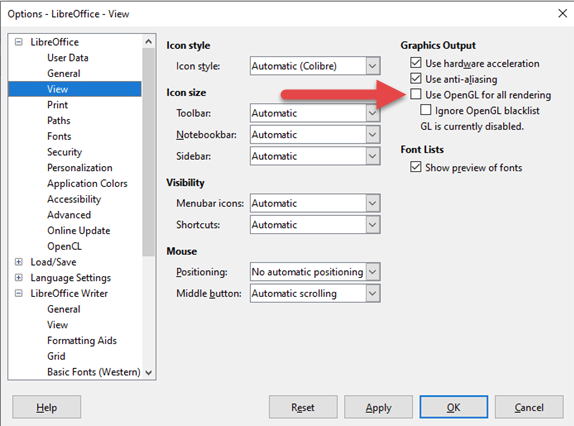
If you do install LibreOffice, we recommend you make the following change to the settings to disable OpenGL (Open Graphics Library) and get the best possible user experience. Disabling OpenGL resolves any display related issues (for example, black borders) when viewing documents and summaries in EMIS Web.
- Launch the LibreOffice application.
- Go to Tools > Options > LibreOffice > View.
- Untick the Use OpenGL for all rendering option.
- Click Apply.
Was this article helpful?
That’s Great!
Thank you for your feedback
Sorry! We couldn't be helpful
Thank you for your feedback
Feedback sent
We appreciate your effort and will try to fix the article