If EMIS Web is not running, firstly check that GlobalProtect VPN is connected:
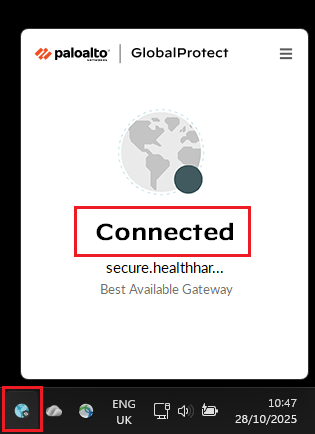
If the VPN is not connected you must connect first before running EMIS Web. EMIS Web will not run without the VPN connected first.
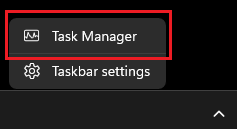
If the VPN is connected, see if the EMIS Process is running. Right click on your Windows Taskbar (on the right side of the Taskbar) and select Task Manager:
In Task Manager, search for EMIS. If the EMIS process is running, right click on it and select :
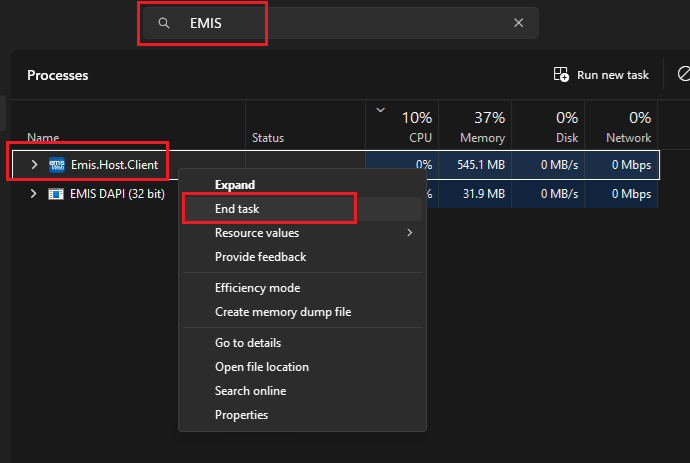
Close Task Manager and try opening EMIS Web again. Please remember, sometimes after double clicking on the EMIS Web icon, it may take a few seconds to open - be patient.
If EMIS is still not running, download the EMIS installation file from the link below and re-install (please make sure you are connected to the VPN before re-installing EMIS).
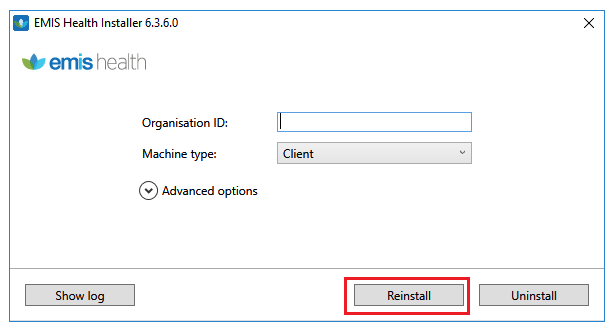
Organisation ID:
ADHD - 153156
Health Harmonie: 2825
Was this article helpful?
That’s Great!
Thank you for your feedback
Sorry! We couldn't be helpful
Thank you for your feedback
Feedback sent
We appreciate your effort and will try to fix the article