Login to EMIS Web with your Username and Password.
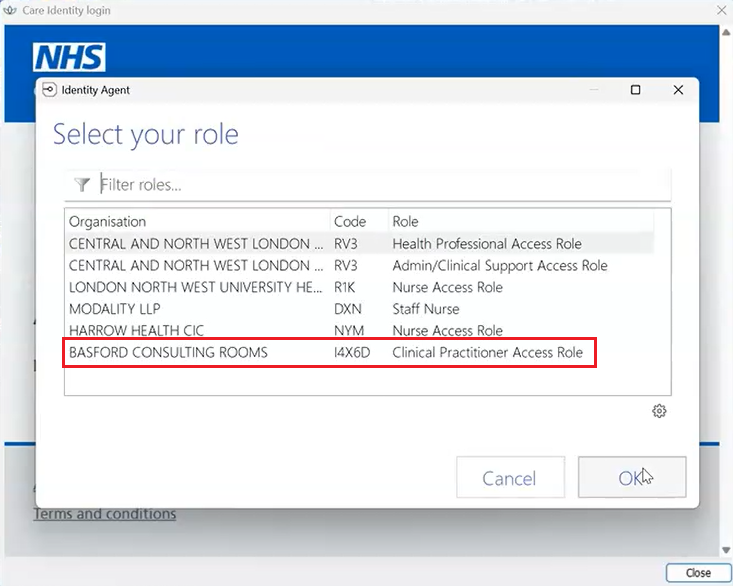
After you have logged into EMIS, insert your NHS Smartcard and select one of the the following Roles:
| Clinicians (Prescribing) | BASFORD CONSULTING ROOMS I4X6D Clinical Practitioner Access Role |
| ADHD Staff | BASFORD CONSULTING ROOMS I4X6D HH Minds C&B Administrator |
You will then see the following Smartcard Alert message at the top of the EMIS window asking you to assign your smartcard:

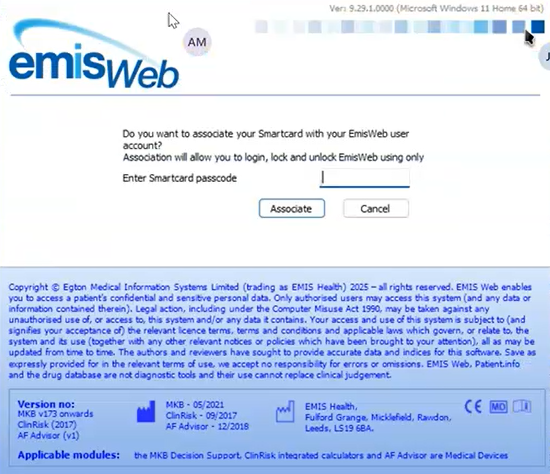
Click on the message and you will be prompted to enter your Smartcard PIN (passcode) and then click on Associate:
You will then see a message saying 1 out of xx smartcard roles have been associated successfully (where xx represents other smartcard roles you may have).
EMIS will restart and then login with your Smartcard.
When users have logged into EMIS with their Smartcard, the NHS logo in the bottom left hand corner of EMIS will be blue (not grey) meaning you are connected to the NHS Spine:

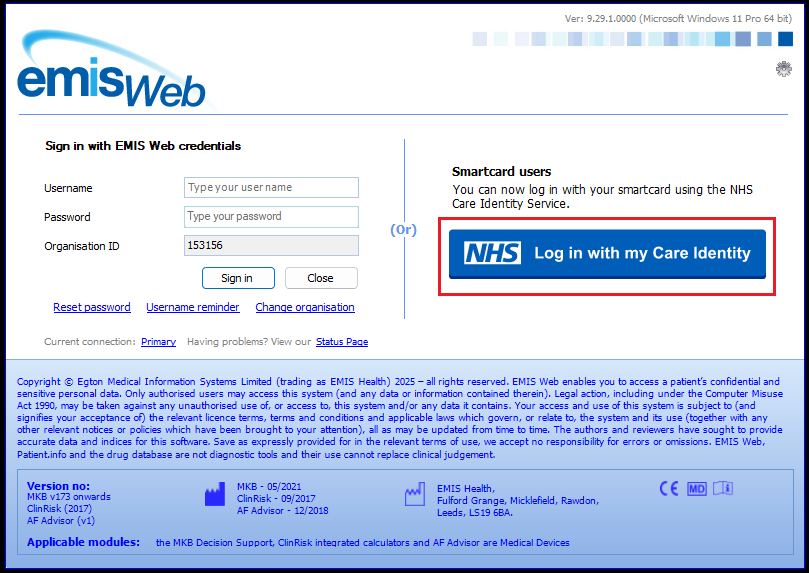
Next time a user logs into EMIS they must inert their Smartcard first and then click on Log in with my Care Identity:
Was this article helpful?
That’s Great!
Thank you for your feedback
Sorry! We couldn't be helpful
Thank you for your feedback
Feedback sent
We appreciate your effort and will try to fix the article